mirror of
https://github.com/comit-network/xmr-btc-swap.git
synced 2025-12-17 09:34:16 -05:00

205 lines
11 KiB
Markdown
205 lines
11 KiB
Markdown
# Automated Swap Backend (ASB)
|
|
|
|
## Quick Start
|
|
|
|
The recommended way to operate an ASB is through the `orchestrator` tool that ships with this repository.
|
|
The orchestrator generates a hardened Docker Compose environment that runs the ASB together with dedicated Bitcoin and Monero infrastructure.
|
|
Refer to the [orchestrator README](https://github.com/eigenwallet/core/blob/main/swap-orchestrator/README.md) for a full command reference, architecture overview, and automation tips.
|
|
|
|
1. Install [Docker](https://docs.docker.com/engine/install/) and [Docker Compose](https://docs.docker.com/compose/install/) on the machine that will host your maker.
|
|
2. Download the latest [orchestrator release](https://github.com/eigenwallet/core/releases) (or build it from source) and make the binary executable.
|
|
3. Create an empty working directory, place the binary inside and start the wizard: `./orchestrator`.
|
|
4. Pick the networks you want to operate on (mainnet or the Bitcoin testnet/Monero stagenet pair) and answer the prompts about ports, Tor settings and maker parameters.
|
|
5. Once the wizard finishes run `docker compose up -d --build` from the same directory to start the environment.
|
|
6. Attach to the ASB control shell with `docker compose attach asb-controller` and type `help` to inspect available commands.
|
|
The README includes additional controller examples if you need to script JSON-RPC calls.
|
|
|
|
The generated `config.toml` lives next to `docker-compose.yml`. Edit it to adjust maker parameters, then restart the ASB container with `docker compose restart asb` to apply the changes.
|
|
|
|
### Running on mainnet vs. testnet
|
|
|
|
The orchestrator allows you to select the networks during the wizard. Choose Bitcoin testnet & Monero stagenet for a dry run, or Bitcoin mainnet & Monero mainnet for production.
|
|
|
|
If you run on mainnet we strongly recommend keeping the default self-hosted nodes that the orchestrator provisions. They provide better privacy than connecting to third-party RPC servers.
|
|
|
|
### Connect with others
|
|
|
|
Consider joining the designated [Matrix chat](https://matrix.to/#/%23unstoppableswap-market-makers:matrix.org) to connect with other individuals running asbs. The core developers are active in this chat and always looking for feedback.
|
|
|
|
### Using Docker
|
|
|
|
The orchestrator manages the Docker Compose setup for you.
|
|
Re-run `./orchestrator` whenever you want to regenerate the compose file with new container images or port assignments—the tool preserves your `config.toml` and Docker volumes.
|
|
Day-to-day operations happen via `docker compose` from the orchestrator directory (`up`, `down`, `logs`, `ps`, etc.).
|
|
|
|
## ASB Details
|
|
|
|
The ASB is a long running daemon that acts as the trading partner to the swap CLI.
|
|
The CLI user is buying XMR (i.e. receives XMR, sends BTC), the ASB service provider is selling XMR (i.e. sends XMR, receives BTC).
|
|
The ASB can handle multiple swaps with different peers concurrently.
|
|
The ASB communicates with the CLI on various [libp2p-based](https://libp2p.io/) network protocols.
|
|
|
|
Both the ASB and the CLI can be run by anybody.
|
|
The CLI is designed to run one specific swap against an ASB.
|
|
The ASB is designed to run 24/7 as a daemon that responds to CLIs connecting.
|
|
Since the ASB is a long running task we specify the person running an ASB as service provider.
|
|
|
|
### ASB discovery
|
|
|
|
The ASB daemon supports the libp2p [rendezvous-protocol](https://github.com/libp2p/specs/tree/master/rendezvous).
|
|
Usage of the rendezvous functionality is entirely optional.
|
|
|
|
You can configure one or more rendezvous points in the `[network]` section of your config file.
|
|
For the registration to be successful, you also need to configure the externally reachable addresses within the `[network]` section.
|
|
For example:
|
|
|
|
```toml
|
|
[network]
|
|
rendezvous_point = [
|
|
"/dns4/discover.unstoppableswap.net/tcp/8888/p2p/12D3KooWA6cnqJpVnreBVnoro8midDL9Lpzmg8oJPoAGi7YYaamE",
|
|
"/dns4/discover2.unstoppableswap.net/tcp/8888/p2p/12D3KooWGRvf7qVQDrNR5nfYD6rKrbgeTi9x8RrbdxbmsPvxL4mw",
|
|
"/dns4/darkness.su/tcp/8888/p2p/12D3KooWFQAgVVS9t9UgL6v1sLprJVM7am5hFK7vy9iBCCoCBYmU",
|
|
"/dns4/eigen.center/tcp/8888/p2p/12D3KooWS5RaYJt4ANKMH4zczGVhNcw5W214e2DDYXnjs5Mx5zAT",
|
|
"/dns4/swapanarchy.cfd/tcp/8888/p2p/12D3KooWRtyVpmyvwzPYXuWyakFbRKhyXGrjhq6tP7RrBofpgQGp",
|
|
"/dns4/rendezvous.observer/tcp/8888/p2p/12D3KooWMjceGXrYuGuDMGrfmJxALnSDbK4km6s1i1sJEgDTgGQa",
|
|
"/dns4/aswap.click/tcp/8888/p2p/12D3KooWQzW52mdsLHTMu1EPiz3APumG6vGwpCuyy494MAQoEa5X",
|
|
"/dns4/getxmr.st/tcp/8888/p2p/12D3KooWHHwiz6WDThPT8cEurstomg3kDSxzL2L8pwxfyX2fpxVk",
|
|
]
|
|
external_addresses = ["/dns4/example.com/tcp/9939"]
|
|
```
|
|
|
|
For more information on the concept of multiaddresses, check out the libp2p documentation [here](https://docs.libp2p.io/concepts/addressing/).
|
|
In particular, you may be interested in setting up your ASB to be reachable via a [`/dnsaddr`](https://github.com/multiformats/multiaddr/blob/master/protocols/DNSADDR.md) multiaddress.
|
|
`/dnsaddr` addresses provide you with flexibility over the port and also allow you to register two addresses with transports (with and without websockets for example) under the same name.
|
|
|
|
### Setup Details
|
|
|
|
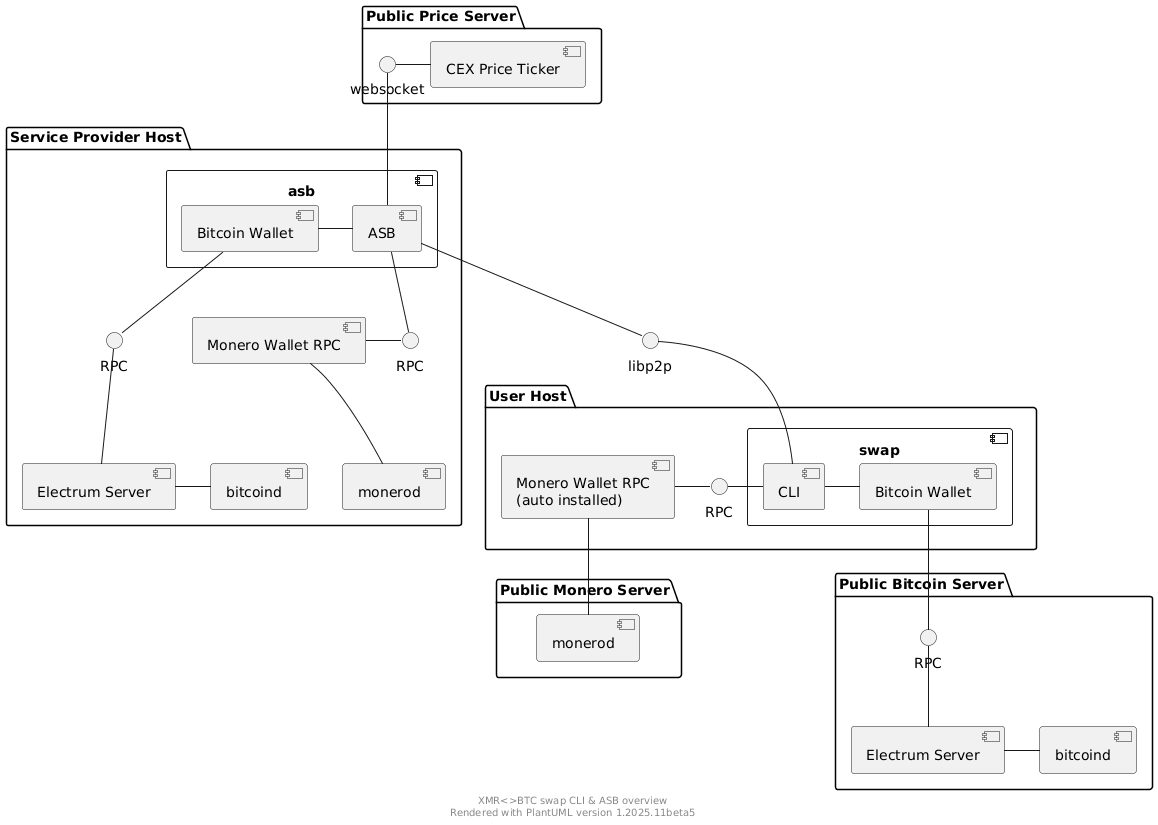
In order to understand the different components of the ASB and CLI better here is a component diagram showcasing the ASB and CLI setup using public Bitcoin and Monero infrastructure:
|
|
|
|

|
|
|
|
Contrary, here is a diagram that showcases a service provider running it's own blockchain infrastructure for the ASB:
|
|
|
|
|
|
|
|
The diagram shows that the `asb` group (representing the `asb` binary) consists of three components:
|
|
|
|
1. Monero Wallet
|
|
2. Bitcoin Wallet
|
|
3. ASB
|
|
|
|
The `ASB` depicted in the diagram actually consists of multiple components (protocol impl, network communication, ...) that sums up the functionality to execute concurrent swaps in the role of Alice.
|
|
|
|
#### Monero Wallet Setup
|
|
|
|
The ASB manages Monero wallets internally through direct FFI bindings and stores them inside the Docker volume mounted at `/asb-data`.
|
|
On first start it creates a wallet and prints the primary address in the logs.
|
|
Fund that wallet with enough XMR liquidity to cover the swaps you intend to make.
|
|
You can export the wallet seed (and restore height) via the controller's `monero-seed` command when you need to recover it in another wallet application.
|
|
|
|
#### Bitcoin Wallet Setup
|
|
|
|
The ASB has an internally managed Bitcoin wallet.
|
|
The Bitcoin wallet is created upon initial startup and stored in the data folder of the ASB (configured through initial startup wizard).
|
|
|
|
#### Market Making
|
|
|
|
For market making the ASB offers the following parameters in the config:
|
|
|
|
```toml
|
|
[maker]
|
|
min_buy_btc = 0.0001
|
|
max_buy_btc = 0.0001
|
|
ask_spread = 0.02
|
|
price_ticker_ws_url = "wss://ws.kraken.com"
|
|
external_bitcoin_address = "bc1..."
|
|
developer_tip = 0.02
|
|
```
|
|
|
|
The minimum and maximum amount as well as a spread, that is added on top of the price fetched from a central exchange, can be configured.
|
|
|
|
`external_bitcoin_address` allows to specify the Bitcoin address that the ASB will use to redeem or punish swaps.
|
|
If the option is not set, a new address from the internal wallet is used for every swap.
|
|
|
|
`developer_tip` allows configuring your maker to donate a small part of swaps to funding further development of the project. This is disabled by default. You can manually enable it if you choose to do so. Set it to a number between 0 and 1. Setting it to 0.02 will donate 2% of each swap to the donation address of the project. The tip is sent by adding an additional output to the Monero lock transaction of a swap. This means this will not impact the availability of your UTXOs (unlocked funds) as it does not require an additonal transaction.
|
|
|
|
In order to be able to trade, the ASB must define a price to be able to agree on the amounts to be swapped with a CLI.
|
|
The `XMR<>BTC` price is currently determined by the price from the central exchange Kraken.
|
|
Upon startup the ASB connects to the Kraken price websocket and listens on the stream for price updates.
|
|
You can plug in a different price ticker websocket using the `price_ticker_ws_url` configuration option.
|
|
You will have to make sure that the format returned is the same as the format used by Kraken.
|
|
|
|
Currently, we use a spot-price model, i.e. the ASB dictates the price to the CLI.
|
|
A CLI can connect to the ASB at any time and request a quote for buying XMR.
|
|
The ASB then returns the current price and the minimum and maximum amount tradeable.
|
|
|
|
#### Swap Execution
|
|
|
|
Swap execution within the ASB is automated.
|
|
Incoming swaps request will be automatically processed, and the swap will execute automatically.
|
|
Swaps where Bob does not act, so Alice cannot redeem, will be automatically refunded or punished.
|
|
If the ASB is restarted unfinished swaps will be resumed automatically.
|
|
|
|
The refund scenario is a scenario where the CLI refunds the Bitcoin.
|
|
The ASB can then refund the Monero which will be automatically transferred back to the `asb-wallet`.
|
|
|
|
The punish scenario is a scenario where the CLI does not refund and hence the ASB cannot refund the Monero.
|
|
After a second timelock expires the ASB will automatically punish the CLI user by taking the Bitcoin.
|
|
|
|
More information about the protocol in this [presentation](https://youtu.be/Jj8rd4WOEy0) and this [blog post](https://comit.network/blog/2020/10/06/monero-bitcoin).
|
|
|
|
All claimed Bitcoin ends up in the internal Bitcoin wallet of the ASB.
|
|
The ASB offers a commands to withdraw Bitcoin and check the balance, run `./asb --help` for details.
|
|
|
|
If the ASB has insufficient Monero funds to accept a swap the swap setup is rejected.
|
|
Note that there is currently no notification service implemented for low funds.
|
|
The ASB provider has to monitor Monero funds to make sure the ASB still has liquidity.
|
|
|
|
#### Tor and hidden services
|
|
|
|
If `tor.register_hidden_service` is set to `true` that asb will automatically start listening on an onion service.
|
|
|
|
### Exporting the Bitcoin wallet descriptor
|
|
|
|
First use `swap` or `asb` with the `export-bitcoin-wallet` subcommand.
|
|
|
|
Output example:
|
|
|
|
```json
|
|
{
|
|
"descriptor": "wpkh(tprv8Zgredacted.../84'/1'/0'/0/*)",
|
|
"blockheight": 2415616,
|
|
"label": "asb-testnet"
|
|
}
|
|
```
|
|
|
|
The wallet can theoretically be directly imported into
|
|
[bdk-cli](https://bitcoindevkit.org/bdk-cli/installation/) but it is easier to
|
|
use Sparrow Wallet.
|
|
|
|
Sparrow wallet import works as follows:
|
|
|
|
- File -> New wallet -> Give it a name
|
|
- Select "New or Imported Software Wallet"
|
|
- Click "Enter Private Key" for "Master Private Key (BIP32)"
|
|
- Enter the `xprv...` or `tprv...` part of the descriptor (example above is `tprv8Zgredacted...`:
|
|
|
|

|
|
|
|
- Click "Import"
|
|
- Leave the derivation path as `m/84'/0'/0'` and click "Import Keystore" button
|
|
- Click "Apply" and then supply password
|
|
|
|

|
|
|
|
- Click Transactions tab
|
|
- ???
|
|
- Profit!
|
|
|
|

|
|
|
|
If the bitcoin amount in your wallet doesn't match "asb balance" output and you don't see (all) the transactions you need to increase the gap limit:
|
|
|
|
- go to Settings > Advanced... > Gap limit
|
|
|
|

|